Client Portals for Accountants
A client portal for accountants replaces the email-attachment shuffle with one secure place your clients upload documents, sign engagement letters, and see exactly where their return stands. We build it on a portal foundation we have already shipped, tailored to how your firm actually runs engagements.
Stop Chasing Clients for Documents
Most of busy season is not accounting, it is collection: the missing K-1, the 1099 that arrives in March, the prior-year return a new client swears they sent. Each one is another email thread, another unencrypted attachment, another thing your admin has to chase.
In the portal, every engagement starts with a document checklist. Clients see exactly what you still need, upload straight from their phone, and everything lands in the right engagement instead of a shared inbox. Engagement letters go out the same way and come back signed before any work begins, so no return starts without a letter on file.
Where Every Return Stands, Without the Status Calls
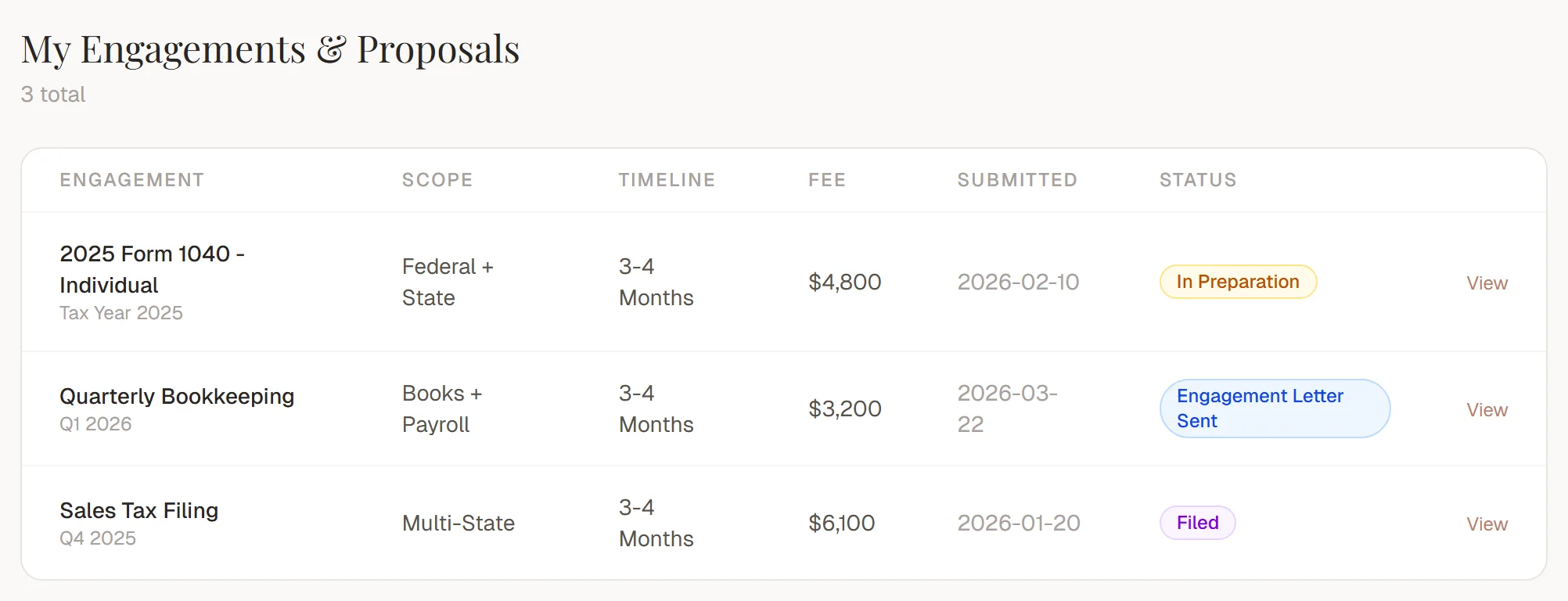
"Is my return done yet?" calls pile up from February to April. With a portal, every engagement shows its real stage: documents received, in preparation, in review, ready for signature, e-filed, accepted. If you file an extension, the client sees that too, with the new timeline attached, instead of finding out by voicemail.
Your preparers update a status once. The client, the partner, and the front desk all see the same thing, and the phone gets quieter exactly when your firm can least afford interruptions.
Built for Bookkeeping and Monthly Clients Too
Tax season is the crunch, but recurring work is the backbone: monthly bookkeeping, quarterly estimates, sales tax filings, payroll. Those clients have the same questions every cycle, and the answers live in the same scattered places.
In the portal, a bookkeeping client sees each month's close as its own engagement, with the documents you need from them, the deliverables you owe back, and the invoice for the period, all in one thread. When their bank statements are late, the checklist says so. When the close is done, they see it without emailing you. The history stays attached to the client, so January's questions do not restart from zero.
Your Portal, Not Another Software Subscription
Practice management suites come with a client portal, and it works the way the vendor decided it should. Your firm adapts its process to the software, your clients learn an interface that looks identical for every firm using it, and the per-user pricing grows with you forever.
A custom portal inverts that. It runs on your domain under your brand, the stages match how your firm actually moves work from intake to filing, and the intake forms ask your questions in your order. Clients see one clean login with your name on it, not a third-party tool you happen to rent. And it connects to what you already use, QuickBooks included, instead of asking you to migrate your practice into someone else's system.
Why Accounting Firms Outgrow Email and Spreadsheets
Engagement letters in one tool, client documents in email, deadlines in a spreadsheet, invoices in your practice software: it holds together until mid-March, when extensions, late K-1s, and a new business client all hit the same week. A portal puts intake, document collection, engagement status, and approvals on one system, so every touchpoint with a client stays attached to the engagement it belongs to.
We build each portal on a foundation we have already shipped for order-driven businesses, then shape the intake form, stages, and vocabulary around your firm: individual returns, business returns, bookkeeping, payroll, and the review and filing steps your partners actually sign off on. Book a free audit and we will map your busy season workflow before writing a line of code.
What Every Lever Portal Includes
Every portal starts from a proven foundation we have already built and shipped, then gets tailored to your workflow.
A pre-built portal foundation
Intake, quotes, orders, and payments are already wired together. We tailor it to your workflow instead of starting from zero.
Roles for customers, staff, and production
Customers see their orders, your team sees the full queue, and the shop floor sees its assignments. Everyone gets exactly their slice.
Automatic email notifications
Quote ready, status changed, invoice due. Your customers hear about it without anyone writing an email.
Integrations with your existing tools
Connect your CRM, email marketing, and accounting so data stops living in six disconnected places.
Payments, invoices, and PDFs
Customers approve quotes, download invoices, and pay online without a single phone call.
Real-time order status
Production updates flow straight to the customer's dashboard. No more "where is my order?" calls.
Start With the Baseline Portal
From $999 setup + $299/mo
Managed for you
Setup tailors the portal to how your business actually runs - your services, statuses, and intake fields. The monthly covers hosting, management, and ongoing changes, with payments landing directly in your own Stripe account. Integrations and custom features get scoped on your call.
We Have Already Built This
Customer Portal for a Made-to-Order Manufacturer
A spec build for a custom fireplace screen manufacturer - replacing six fragmented tools and a brittle Zapier setup with a single portal that runs the full order lifecycle, from intake to production to payment.
Frequently Asked Questions
How long does it take to build a client portal for an accounting firm?
Days to a few weeks, not months. We start from a portal foundation we have already built and shipped, then tailor the document checklists, engagement stages, and roles to how your firm runs individual, business, and bookkeeping work. You can explore the live demo of that foundation before we start.
How is this different from the portal inside my practice management software?
The portal in an off-the-shelf suite is their product, their workflow, and their brand, rented per seat. Yours runs on your own domain, matches how your firm actually stages work, and only includes what your clients need to see. You are not paying per client, and your client experience does not look like every other firm using the same software.
Is it secure enough for tax documents?
Yes. Every client gets their own login and only sees their own engagements, files are encrypted in transit and at rest, and staff access is role-based. That is a meaningful step up from W-2s and bank statements sitting in an email inbox, which is where most firms keep them today.
Can clients sign engagement letters and approve returns in the portal?
Yes. Engagement letters go out through the portal and clients accept with a click, so nothing starts without a signed letter on file. The same approval flow works for reviewing a drafted return before you e-file, and every approval is timestamped and attached to the engagement.
Will it stop the status calls during tax season?
That is the point. Every engagement shows its real stage, from documents received through preparation, review, e-file, and accepted. Clients check the portal instead of calling the front desk, and your team updates a status once instead of answering the same question ten times.
What does it cost?
The baseline portal starts at $999 setup plus $299 per month, managed for you. Setup tailors the intake, document checklists, and engagement stages to your firm, and the monthly covers hosting, management, and ongoing changes. Integrations and custom features get scoped on a free call before anything begins.